On 18th September 2012, Microsoft released a temporary fix for a discovered software vulnerability. The security flaw in question allows the Poison Ivy Trojan to be installed on its browsers – and according to Microsoft’s website, nearly all versions are affected. This malware is capable of stealing data and taking remote control of PC’s, so it’s important to act fast.
If you’re an Internet Explorer user, the advice is to swap to another browser until a permanent software update is available (which should be in around a week).
If you’re wondering whether dedicating time and effort to social media is really worth it, this new research may just make your mind up!
The Harvard Business Review recently published a great article about social media that we think all Chief Executives and Managing Directors NEED to read! The latest report from CEO.com and business intelligence firm DOMO has confirmed our view that social media is more pervasive than ever among consumers. In fact, a whopping 50% of the population currently uses Facebook and more than 37% use Twitter.
The report found that among Fortune 500 CEOs, only 7.6% are present on Facebook, only 4% use Twitter, and less than 1% use Google Plus. However, there is evidence that this may be changing.
A recent survey conducted by IBM found that out of 1,709 CEOs, only16% used social media. The study predicts this figure may grow to 57% within 5 years and that social media will become one of the two most important forms of engagement with employees and customers, second only to face to face interactions.
Thankfully, Managing Directors and Executives are finally recognising what the team here at Seven Creative already know – using social media to communicate and engage with customers, suppliers and their own employees, means their company will be more adaptive, agile and of course, more successful.
As experts in social media, we value the many advantages of using social media very highly. And we receive ongoing confirmation from our customers that our management of their social media channels generates more business, provides access to potential customers, and provides effective communication channels for existing customers.
Using social media is so effective in fact, that The BRANDFog 2012 CEO Survey found that more than 82% of respondents are likely or much more likely to trust a company who engage in social media. The study also reports that 77% of respondents are likely or much more willing to buy from a company whose mission and values are defined through their involvement in social media.
Here at Seven Creative, we agree that social media is vital for business. It will give your business a strong potential competitive advantage, not only by providing communication channels, but by boosting traffic to your website and increasing sales. But what if you don’t have time? What if you’re busy running your business?
We understand social media marketing, and we know that using it in this dynamic, complex and ever-evolving marketplace requires knowledge and experience. Seven Creative are experts in the field, and we can offer you a full spectrum of social media integration services. In other words, we can do it for you, and therefore remove the time and the hassle that social media can become if it’s not managed correctly. And to keep you in the loop, we’ll let you know exactly what we’ve done in regular reports, proving to you that we’re getting results!
Not so long ago, the only way to have a half-decent looking animation on a website was using Adobe Flash.
Movement and interactive images could help sites engage with their customers and it was therefore a useful tool for some sites.
Because, at Seven Creative, we have always focussed on creating usable and optimised websites without sacrificing anything to ‘floweriness’, we’ve generally always avoided using Flash or, at least, only ever used it where appropriate. We could see the usefulness of the software for some niche sites, however, the negatives always outweighed any potential gains.
This is why we could see the impending end of Flash when most of the industry was still using this technology.
One of the main issues with Flash is that it can’t be read by search engines. Sites that are built this way – or even have areas like their navigation in Flash – will not index for these generally highly important site elements. Opportunities are lost as function is sacrificed to form.
One of our other main bug niggles with Flash is that you can’t edit it in the way that you can easily edit HTML using a WYSIWYG editor which is why it’s not something we would feel comfortable providing to our customers. Technology has evolved and there are newer and better methods for providing the same level of animation and interaction but with easily editable content.
Roll on a few years and Apple release their range of mobile devices that don’t support Flash. Suddenly, there are a lot of websites that won’t display properly – if at all – on some mobile devices.
This shook the industry and signalled the beginning of the end.
Android – Google’s operating system – is released and initially supported Flash, however, they’ve recently said that, from version 4.1, they’ll no longer be supporting this anachronistic technology. So, from August 15th 2012, any Android device that does not currently have Flash Player installed will never be able to install it.
There is no doubt that other browsers will also begin to end support for this technology over the next few years.
Good news for us and our customers but bad news for the hundreds of thousands of websites out there that rely on Flash.
You might think that we’re still OK at the moment as this currently only really effects mobile devices, however, they already account for a good chunk of the visitors to most websites and this is only set to increase. This is before you get us started on the missed opportunities in search engine optimisation terms!
If you want our advice, act now. Dumping Flash might not be such a big issue for most sites and may not require a full rebuild.
If digital marketing is all about spotting and taking opportunities, seeing an opportunity and ignoring it is madness!
At Seven Creative, we specialise in communicating. So if you don’t have the time to manage your own social networking and marketing, we can do it for you.
We are able to set up and write your blog, write articles, take care of your direct mailing, manage your social networking and your email marketing. In short, we make sure that your message is in front of the right people at the right time.
Our customers find the service a very cost-effective way to retain their current customer base, and find new customers at the same time. It can even give your website a huge boost in the organic listings on Google and the other major search engines.
Satisfied customers
“Seven Creative are our sales and marketing department”
“Seven Creative are such a great company to work with – friendly, knowledgeable and providing an amazing social network and marketing service. We now have a large and very active online community who actively promote our business. Stunning value for money!”
“The social networking management and email marketing campaign that Seven Creative write and manage for me gives an amazing return. Suddenly we’re all over the internet and we’re becoming the name associated with wooden windows”
Let us manage your social networking and marketing, and you can keep doing what you do best – running your business.
Give us a call today and let us show you how digital marketing will work for you.
Our email marketing system allows you to send branded and beautiful correspondence from as little as 1p per recipient. Email marketing is a really cost-effective way of talking to customers and potential customers.
And, because the cost is so low, it means you can not just email once, but many, many times over the course of the year, helping you to develop your customer relationships.
You can include anything you like in your newsletter; lastest news from your business, special offers, or new products. Anything at all that you think your customers would find interesting or need to know!
Your email newsletter can include links to your website too. This enables your customers and potential customers to access your products and services at the click of a mouse.
We also have access to detailed reports enabling us to monitor how many people have opened the newsletter, where they are and whether or not they have clicked on the links. It’s a fantastic way of measuring the effects of your email marketing campaign!
We have recently sent out an email newsletter on behalf of Chesterfield based dog kennels Dunston Lodge. Not only is it branded, we’ve sent it to everyone on their mailing list. Richard Harrington, owner of Dunston Lodge said: “We’re really happy with the service. The newsletter looks fab, and people have even been clicking through to the online booking section of our website too.”
“It’s generated business for us, and has let our customers know that we’re keeping in touch. We’ve also had people click through to our Facebook page, and it’s nice to know everyone is getting our latest news delivered straight to their inbox,” says Richard.
Here at Seven Creative, we think that Google’s celebration of Robert Moog’s 78th Birthday is their best Doodle yet!
Robert Moog was the founder of Moog Music, and an American pioneer of electronic music. He is best known for his invention of the Moog synthesizer, and his memory has been celebrated today in a brilliant Google Doodle.
Robert Moog is famed for his electronic design and synthesisers. We’ve spent quite a bit of the morning fiddling with the Google Doodle, a piano equipped with electronic mixers!
This tutorial will show you how to use your free Gmail SMTP server to send emails from your personal email accounts using Outlook (this example uses Outlook 2007 but still applies in principle to the other versions of Outlook and other local email clients)
This has been prompted by the news that many Virginmedia customers have recently been informed that they will no longer be able to use their Virginmedia SMTP address to send emails other than from their Virginmedia email address. This tutorial will show you how to use your Gmail SMTP address instead
Step 1.
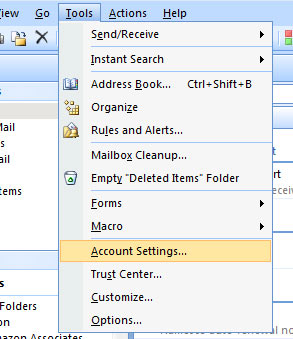
Open Outlook and select 'tools' (from the top menu) then select 'account settings'
Open Outlook and select 'tools' (from the top menu) then select 'account settings'
Step 2.
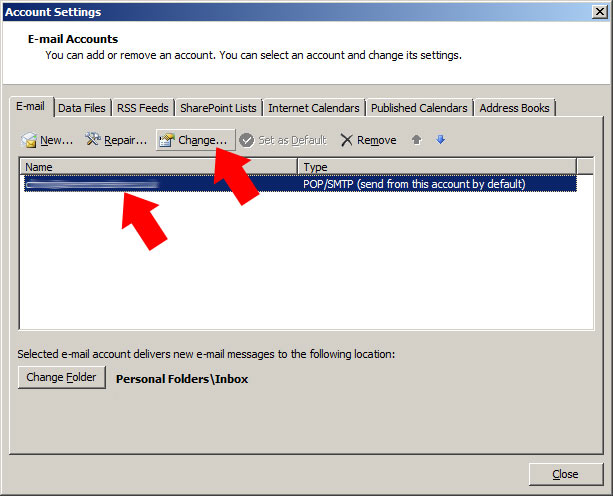
Highlight the account you would like to modify then press 'change'
Highlight the account you would like to modify then press 'change'
Step 3.
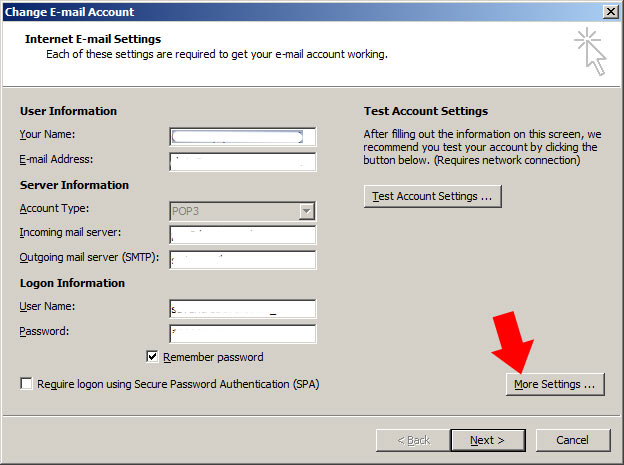
From the 'internet email settings' page, select 'more settings'
From the 'internet email settings' page, select 'more settings'
Step 4.
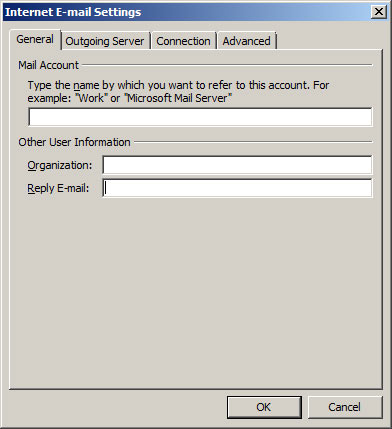
Fill in the information in the three boxes on the 'general' tab (the name you'd like to call this account can be anything, you can leave organisation blank and the reply-to addrsess is the address you'd like people to reply to)
Fill in the information in the three boxes on the 'general' tab
Step 5.
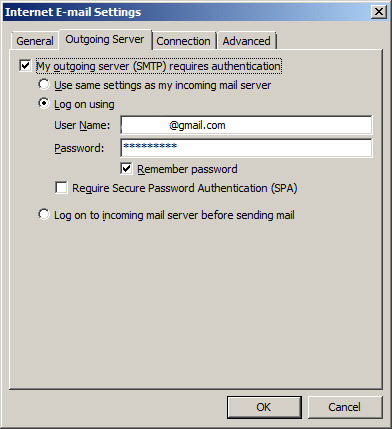
On the outgoing server tab, fill in the following
tick the box that says 'my outgoing server requires authentication',
tick the 'log on using...' option
in the 'user name' box, type in your full Gmail email address
in the password box, type in your Gmail password (the same one you'd use to log into your Gmail account)
un-tick the 'require secure password authentication' and 'log into mail server before...' options
On the outgoing server tab, fill in the following
Step 6.
No need to change anything on the 'connections' tab
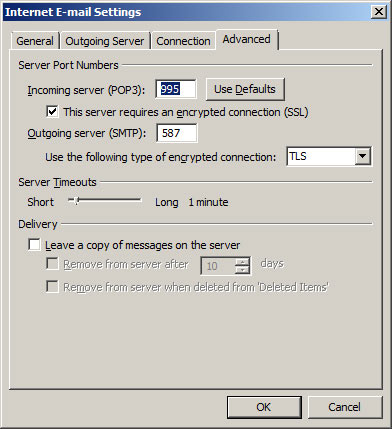
Fill in the following on the 'advanced' tab
change 'incoming server (POP3)' to 995
tick the box 'the server requires an encrypted connection (SSL)'
change 'outgoing server' to 587
from the drop-down options, change the 'use the following type of encrypted connection' to TLS
leave 'server timeouts' as is
un-tick the 'leave copies of the messages on the server' (...which will download the actual email to your computer as opposed to just a copy - this helps avoid duplication)
tick 'OK' to take you back to the 'internet e-mail settings' page
Fill in the following on the 'advanced' tab
Step 7.
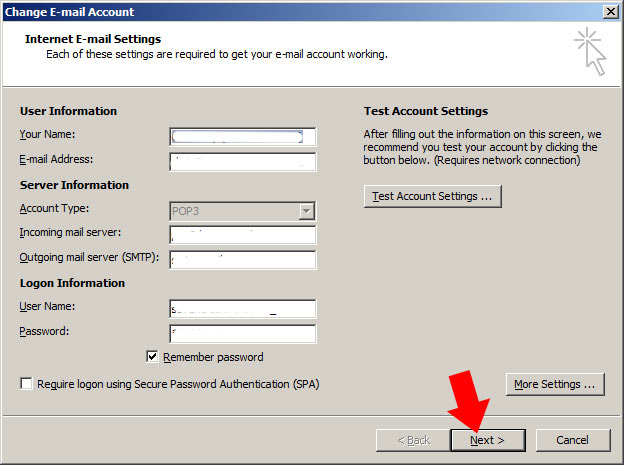
Back on the 'internet e-mail settings' page, click next to save the changes
Back on the 'internet e-mail settings' page, click next to save the changes
2. Go to your account dashboard or the dashboard for the domain you want to share access to
3. Click on “Admin” at the top right of the screen (see below)
4. On the next screen, click on “Users” (see below)
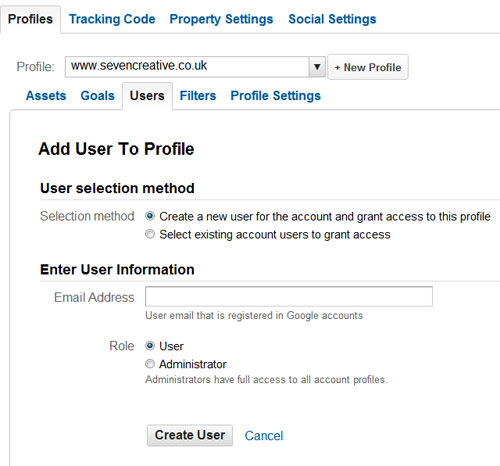
5. On the next screen, click on “+New User” (see below)
6. Insert an email address (or choose from one you have used previously) and assign them as either a user or administrator, then press “Create User” (see below).
TA DAH!!
The added user can now use view your analytics reports
Here atSeven Creative we believe in doing a good job for our customers.
One of the things we don’t tend to shout about, however, is our search engine optimisation activity. When we build a site, it wouldn’t really be fair for us to not build in search engine optimisation features, as once you have at least a basic understanding of optimising websites for organic listing, it’s quite quick to do.
We really enjoy seeing website suddenly rocket in the search engine rankings after we’ve had a bit of a tinker with it. And seeing a rise in website visitors is equally satisfying, as we know then that we’re really having a positive effect on our customers businesses.
After monitoring the analytics results for some of our recent jobs, and being very happy with the results, we felt it was only right to share these success stories. So here are some of the recent site visitor increases for the websites we’ve been working on:
This week, Virgin Media’s electronic programming guide saw offence in innocent words and names, causing them to be censored. The likes of Charles Dickens, Alfred Hitchcock, Arsenal and Jarvis Cocker, became Charles D***ens, Alfred Hitchc**k, A***nal and Jarvis C**ker. And it didn’t stop there. Even the kids were watching D*** and Dom.
Virgin Media blamed the mistake on software which automatically filters out offensive words, but I’m afraid the damage has been done. Any innocent delight taken in ‘The Golden Age of Canals’ is officially over!
It was nice to see that Virgin Media had a sense of humour about it though. A spokesperson said: “Over the weekend a temporarily over-zealous profanity checker took offence at certain programme titles. The altered titles have been swiftly an*lysed and we’re fixing any remaining glitches.”
I thought Virgin Media’s over-zealous censoring of some of the nations favourite TV shows was quite enough to giggle over this week, but when I heard that some baby names had actually been classed as illegal, I had to log on and find out exactly what they were. Get ready for a laugh…..
Talula Does the Hula From Hawaii
A nine year old girl in New Zealand had to be renamed during a custody battle after a judge said the name ‘made a fool of the child’. It certainly does, and filling in forms must take forever. According to New Zealand law, any name that would cause offence to a ‘reasonable person’ can be banned.
Among other banned names in New Zealand are 4Real, Fish and Chips (twins), Yeah Detroit, Keenan Got Lucy and Sex Fruit. Having said that though, the names Number 16 Bus Shelter and Violence were allowed. Bizarre.
Brfxxccxxmnpcccclllmmnprxvclmnckssqlbb11116
No, I promise I didn’t fall asleep on the keyboard. A Swedish couple actually tried to inflict this name on their son. Apparently the name is pronounced ‘Albin’ (I really can’t figure that out), and the parents chose it as a protest against Sweden’s strict naming laws. Sweden has also banned parents from calling their children Metallica, IKEA, and Veranda. Apparently the name Google was OK though…
Smelly Head
Malaysian authorities banned parents from calling their child Chow Tow AKA ‘Smelly Head’. Apparently it doesn’t follow the religious traditions of the country. Other banned names in Malaysia include Khiow Khoo (‘Hunchback’), Sor Chai (‘Insane’), and Woti,(‘Sexual Intercourse’.) Charming.
Devil
In1993 a Japanese parent tried to call his son Akuma, which literally means Devil. The authorities decided this was an abuse of the parent’s rights to decide a child’s name and a lengthy court battle ensued. Eventually the father backed down and the poor little lad got a new, less demonic name. Let’s just hope it wasn’t Damien.