Author: Christophe

  • Free SEO & Social Media surgery – The Workstation, 7th February 2013

    Seven Creative digital marketing SheffieldSeven Creative Social Media and Search Engine Optimisation surgeries

    Seven Creative are running a free 1-to-1 Search Engine Optimisation (SEO) surgery and 1-to-1 Blogging & Social Media Optimisation surgery at the Workstation in Sheffield on 7th February 2013.

    Search Engine Optimisation surgery

    The Search Engine Optimisationsurgery is suitable for businesses who have a website but are not sure how well it is optimised or would like advice on how to further optimise it. This 1-to-1 SEO surgery will help evaluate how well your site is optimised for search engine indexing in terms of both on-page and off-page optimisation.

    During this free and confidential session we’ll look at the major search engines and evaluate your competition. We’ll then focus on the steps that can be taken to increase the search engine visibility of your site.

    Social Media and Blogging surgery

    The Seven Creative Social Media and Blogging surgery is suitable for anyone wishing to either begin using social media & blogging to promote their business, or those who wish to optimise their current social media activity to increase the online visibility of their business.

    This 1-to-1 Social Media Optimisation surgery will help evaluate how well your current social media activity is working to raise the profile of the business and whether this activity can be further optimised.

    During this free and confidential session, we’ll look at the appropriate social channels based on your customer profiles. We’ll also help with the steps that can be taken to further optimise this activity, increase the business’ online visibility and further engage with your online audience.

    Booking

    Slots are available with advance booking and are up-to 30 minutes in length. To book, email Seven Creative at booking@sevencreative.co.uk or call 0114 383 0711 for more information.
  • Google Doodle commemorates the Zamboni ice machine

    The Frank Zamboni Google doodle. Photograph: Google
    The Frank Zamboni Google doodle. Photograph: Google

    The frosty spell of weather we’ve experienced recently, coupled with the 112th birthday of Frank Zamboni, have inspired the latest google doodle.

    The interactive doodle features an ice cleaning machine, invented by Frank Zamboni in 1949.

    Frank Zamboni invented the world’s first self-propelled ice-resurfacing machine. Trademarked in his name, the machine is known as a “Zamboni”. This machine enabled an ice rink to be resurfaced in just 10 minutes, compared to the previous hour and a half three man job.

    Here at Seven Creative web design in Sheffield, we really love the playable doodles, this one especially.

    After watching animated skaters leave the ice rink, the google doodle allows you to move the ice-resurfacing machine around the rink, cleaning it as you go.

    Frank Zamboni died from cancer in 1988 when he was 87, but his ice resurfacing machine continues to be used today. The Zamboni Ice Resurfacer has sold more than 10,000 units of the equipment to date.

  • How to take a screen capture and send it by email

    This tutorial is about taking a shot of your computer screen and sending it – very useful when asking for technical support by email. This assumes you are using a PC and a local email client such as Outlook.

    1. Get whatever it is you’d like to get a screen capture of up on your screen
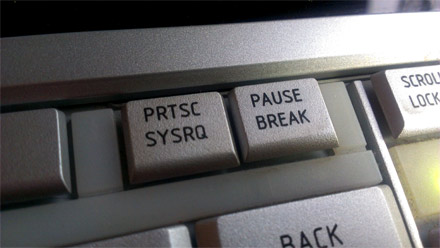
    2. Press the ‘PRTSC’ button. This is short for ‘Print Screen’ and will take a snapshot of your computer screen before sending it. Note: if you’re sending a screen capture of a website, you can press F11 to go full screen before taking the capture (press F11 again to exit full screen mode)

      PRTSC - press to take a screen capture
      PRTSC – press to take a screen capture
    3. Open your email client and open a new email
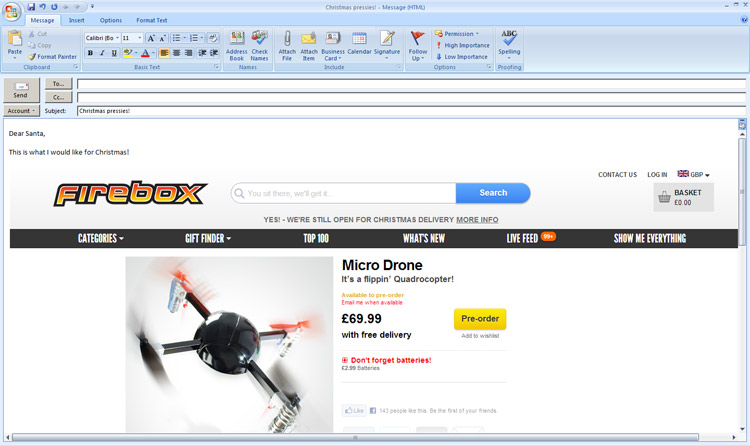
    4. With the cursor in the body of the email at the appropriate place, press and hold ‘CTRL’ then press ‘v’ once. This will paste the screen capture from your clipboard into the email.

      Insert screen capture into your email
      Insert screen capture into your email
  • Domain owners watch out for this new scam

    A customer of ours received this email and asked us what it was.


    From: <scam-company> Admin Department [mailto:admin@<scam-company>.co.uk]
    Sent: 19 December 2012 02:42
    To: INFO Subject: Pending Transfer-IN <your-domain-name.co.uk>

    Dear Mr <your-name>, Please note that your domain <your-domain-name.co.uk> is not yet transferred to <scam-company>. Transferring of a domain name is a simple process.

    Kindly contact your current registrar and ask them to change the Tag of <your-domain-name.co.uk> to “<scam-company>”.

    If you required any further assistance, please do not hesitate to contact us.

    Kind Regards
    <scam-company-contact-details>

    It’s actually a scam and this is how it works. The ‘TAG’ is used by Nominet who administer all ‘.uk’ domain names. It tells Nominet which company should have administrative control over your domain name. The domain administrator (or registrar) is able to make changes to the Nameservers, DNS and most importantly, is responsible for the domain renewals.

    These domain renewals cost price should only be around £5 or £6 per year as this reflects the costs charged by Nominet for the renewal, however, many companies charge many times this making this very profitable for them!

    To summarise, changing the TAG moves the responsibility for the domain renewal over to the new host which means they can then start charging you for the renewals. It’s your guess whether this would mean higher or lower domain prices!

    My advice, delete it and ignore it. If in doubt, ask the company who you currently pay your domain renewal fees to.

  • Updating your password in Outlook 2010 tutorial

    It is very simple to update your email collection (POP3) password in Outlook 2010 by following the steps below:

    1. Open Outlook
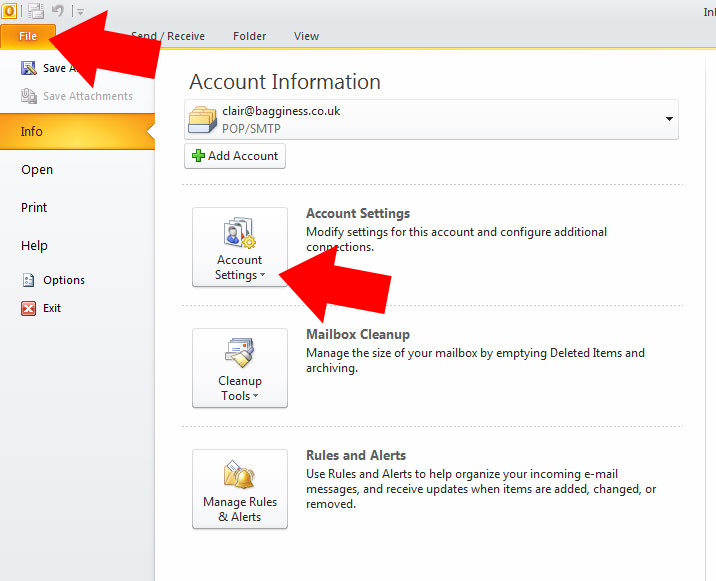
    2. Click on the ‘File’ option at the top of the page
    3. you’ll now have an option for ‘account settings’ – click here

      Open Outlook 2010, click 'file' option at the top of the screen, then click on 'account settings'
      Open Outlook 2010, click ‘file’ option at the top of the screen, then click on ‘account settings’
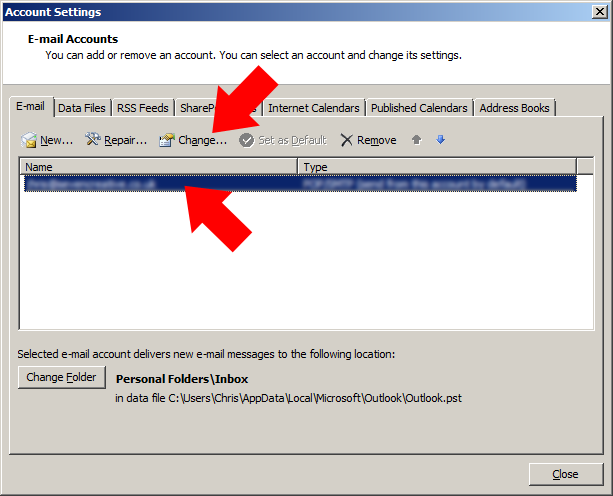
    4. click on the account you’d like to change then select ‘change’

      Click on the email account you's like to change then select 'change'
      Click on the email account you’s like to change then select ‘change’
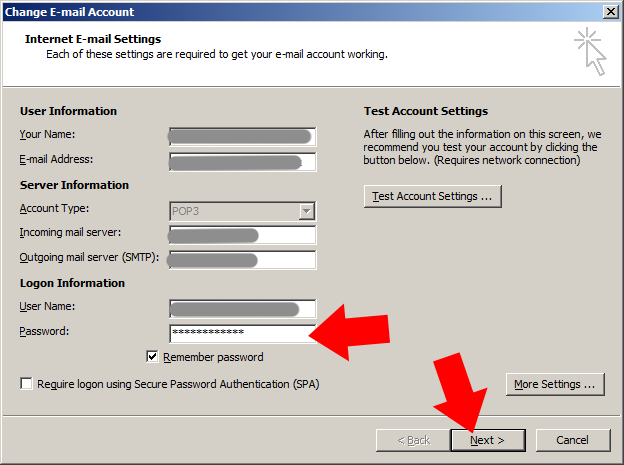
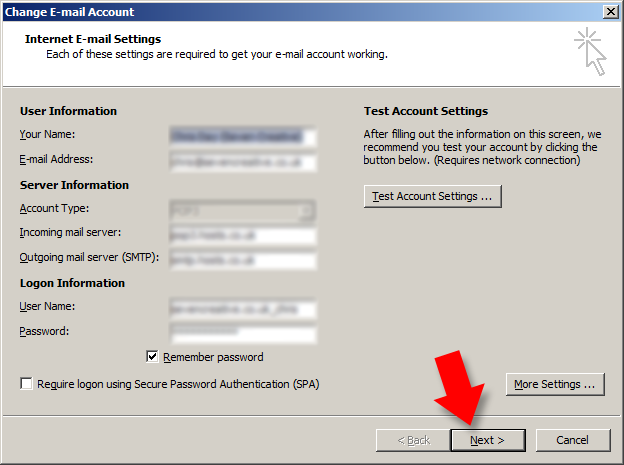
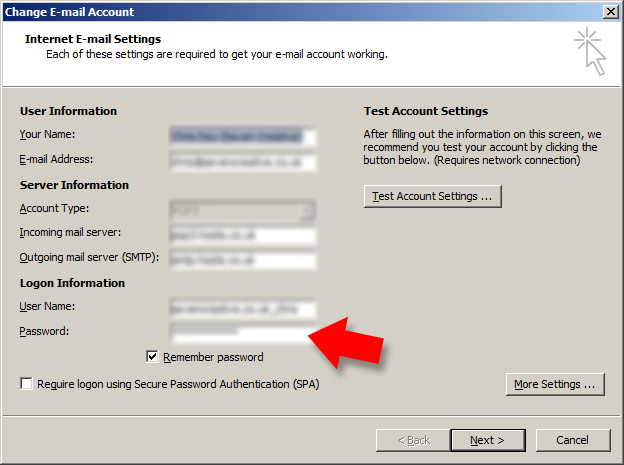
    5. from the ‘account settings page, type in your new password in the ‘password’ box

      From the 'account settings' page, type in your new password into the 'password' box then press 'next'
      From the ‘account settings’ page, type in your new password into the ‘password’ box then press ‘next’
    6. click ‘next’
    7. click ‘finish’
  • Outlook – certificate security warning

    Skip to solution 1 (turning off SSL) or solution 2 (changing your email collection address)

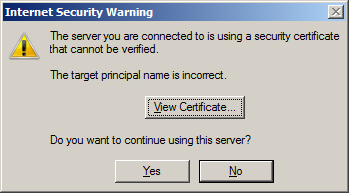
    If you’re using Outlook and getting the the following error message when you try to collect your email, read below for a couple of possible solutions to the problem:

    the server you are connected to is using a security certificate that cannot be verified. The target principal name is incorrect
    “The server you are connected to is using a security certificate that cannot be verified. The target principal name is incorrect””The target principle name is incorrect””Do you want to continue using this server?”

    The cause of the problem

    This problem is caused when the POP3 address (email collection) doesn’t match the SSL certificate that is being used.

    The solution to the problem

    Solution 1 means turning off the SSL encryption requirement, however, many SMTP servers require this SSL setting to successfully send your email so this may not be an option. Also, not using an encrypted connection may leave your correspondence vulnerable. If you’re unsure, get professional support. However, if you try this option as you can always change the setting back again afterwards:

    1. Open Outlook
    2. Click ‘Tools’ from the top menu
    3. Select ‘account settings’ from the ‘tools’ menu
    4. Highlight the email account you are having trouble with and press ‘Change’
    5. From the ‘Change e-mail account’ page click on ‘More settings’
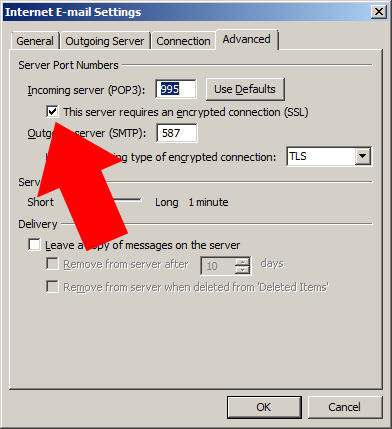
    6. From the ‘Internet email settings’ page choose the ‘advanced’ tab
    7. Un-tick the ‘This server requires authentication’ option
    8. click ‘OK’, then ‘next’ then ‘Finish’

    To undo the changes, follow the above instructions again

    Turn off SSL
    Turn off SSL

    Solution 2 means changing the POP3 (or IMAP) collection address to match the certificate. If you’re not able to contact your ISP to get the correct settings you may be able to guess the right address:

    1. Open Outlook
    2. When the error message appears (as shown at the top of the page) take the name of the certificate from the error massage by selecting ‘view certificate’, for example, in this instance it’s ‘*.hosts.co.uk’
    3. close the error dialogue box
    4. Click ‘Tools’ from the top Outlook menu
    5. Select ‘account settings’ from the ‘tools’ menu
    6. Highlight the email account you are having trouble with and press ‘Change’
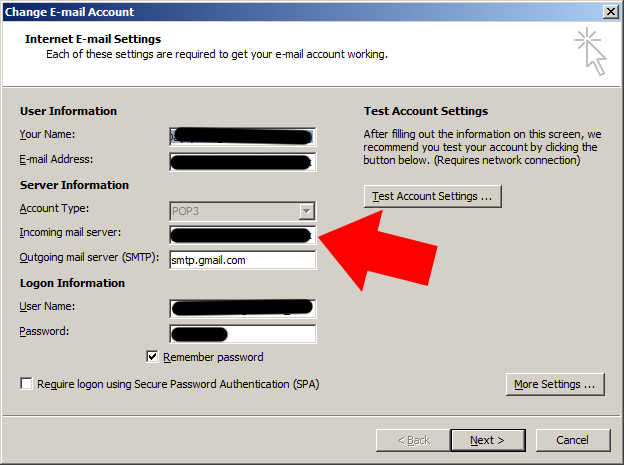
    7. From the ‘Change e-mail account’ page, change the ‘incoming mail server’ address to match the certificate domain, e.g. if the address in this box is something along the lines of ‘pop3.yourdomain.com’ and the certificate address is ‘*.hosts.co.uk’, change the incoming mail server address to ‘pop3.hosts.co.uk’ (don’t forget to keep a note of the current settings just in case you need to change this back)
    8. Click next then finish
    9. Send and receive to check if the problem has been fixed
    Change the incoming mail server address to match the certificate address
    Change the incoming mail server address to match the certificate address
  • Updating your email password and security settings on Outlook 2007

    Here is a short tutorial on how to update your email password and change the connection to the SSL security type.

    Note: this tutorial relates to email collection (POP3 or IMAP) not email sending (SMTP) and email collection connection security only.

    Updating the email collection security type to SSL

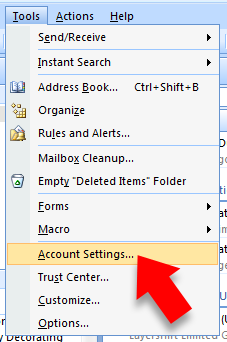
    Step 1 – open Outlook and select ‘account settings’ from the ‘tools’ menu

    open Outlook and select 'account settings'
    open Outlook and select ‘account settings’

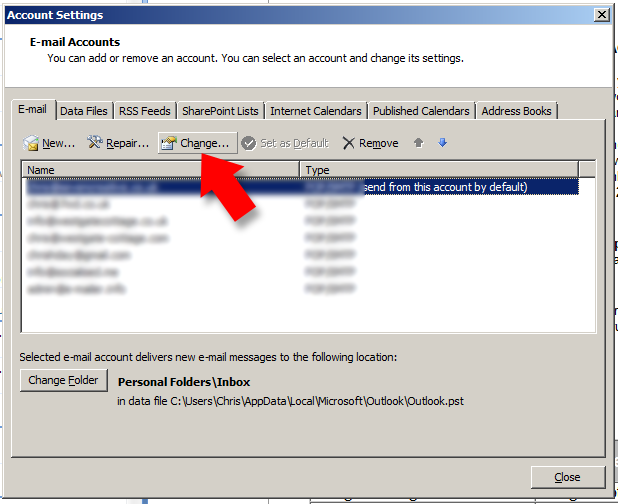
    Step 2 – from the ‘account settings’ dialogue box, highlight the account you’d like to change then press the ‘change’ button

    from the 'account settings' dialogue box, highlight the account you'd like to change then press the 'change' button
    from the ‘account settings’ dialogue box, highlight the account you’d like to change then press the ‘change’ button

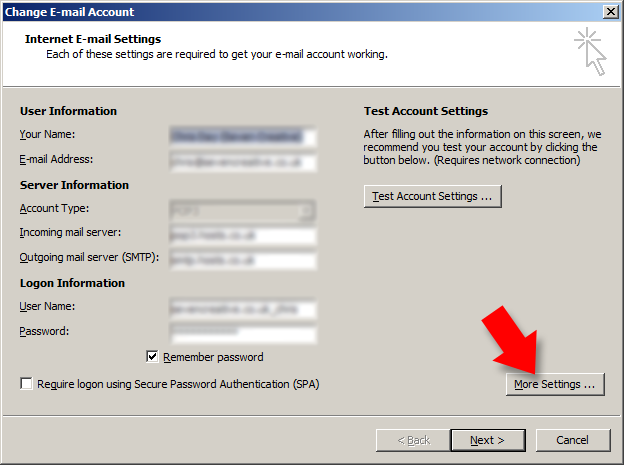
    Step 3 – from the ‘change email account’ dialogue box select ‘more settings’

    from the 'change email account' dialogue box select 'more settings'
    from the ‘change email account’ dialogue box select ‘more settings’

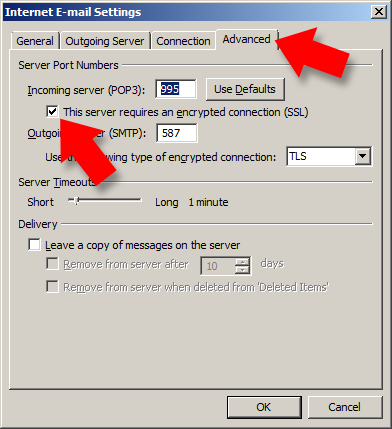
    Step 4 – from the ‘internet email settings’ dialogue box choose the ‘advanced’ tab from along the top then make sure the ‘this server requires an encrypted connection (SSL)’ tick box is ticked

    from the 'internet email settings' dialogue box choose the 'advanced' tab from along the top then make sure the 'this server requires an encrypted connection' tick box is ticked
    from the ‘internet email settings’ dialogue box choose the ‘advanced’ tab from along the top then make sure the ‘this server requires an encrypted connection’ tick box is ticked

    Step 5 – click ‘OK’ and then from back at the ‘change email account’ dialogue box press ‘next’ then ‘finish’

    click OK then from the 'change email account' dialogue box press 'next' then 'finish'
    click OK then from the ‘change email account’ dialogue box press ‘next’ then ‘finish’

    Updating your email collection password

    to update the password used to collect your email:

    Step 1 – follow the above steps 1, 2 and 3

    Step 2 – type in your new password into the ‘password’ box on the ‘change email account’ page

    type in your new password into the 'password' box on the 'change email account' page
    type in your new password into the ‘password’ box on the ‘change email account’ page

    Step 3 – press ‘next’ then ‘finish’


  • Build your business with a blog

    Here at Seven Creative web and marketing agency, we know how important it is to have a great website and a strong presence online. According to a recent study, over 50% of consumers use the internet as a first port of call to find out more about a new business or service.

    So, you have a great website – what next?

    Seven Creative think that a great way to make the most of your website and boost your online presence is to start a company blog. And we’re not alone; numerous businesses across the world are reaping the benefits of blogging. Connecting your blog to your website can do wonders for its traffic flow, as well as many other benefits that we’ll discuss here.

    How can a blog help your business?

    To blog or not to blogBecome an expert in your field

    By writing about subjects that are relevant to your industry, you can become an expert in your field. It’s not difficult to come up with subjects for your blog posts, especially when you’re working in your industry on a daily basis.

    New products, services, industry news gathered from a quick Google search, product development, case studies; these can all spark the beginnings of a great post.  By demonstrating industry knowledge, you can establish your professional credibility and expertise!

    Build relationships with customers

    Having a blog is a great way to engage with existing customers and potential clients.  It goes without saying that building relationships with customers is a must for the development of a successful business. Even if your company is based online and you never meet your customers face to face, informative and interesting blog articles are a great way of communicating, building dialogue and providing a platform for customers to contact you.

    Blogs and search engine optimisation

    Aside from the above benefits, blogs can also be used as a tool to drive traffic to your main website by boosting the search engine optimisation. Remember, not only are you writing informative articles to attract people’s attention and engage them with valuable content, if you make sure that your articles are rich in key words and popular search terms, your blog can increase your SEO efforts too.

    If you would like a blog for your business, but don’t have the time to dedicate to it, or the skills to set it up yourself, Seven Creative web and marketing agency can help. We have set up blogs for a number of clients in a wide variety of industries.  And if you’re stuck for original, interesting content, we can take care of that too. We can even write the articles for you, as frequently as you like! For more information, contact Chris at the Seven Creative office on 0114 383 0711 or contact us via our website.

  • Popular viral marketing campaigns

    There have been many popular viral marketing campaigns in the last few years. Here at Seven Creative towers, we’ve been giggling away at the new Bodyform advert. OK, so there are more women in our office than men, but even Chris managed a guilty smile and a few words of praise for its originality.

    The Bodyform video is actually a response to a post on the Bodyform Facebook page. Many are of the opinion that it’s a set up (including us) but whether real or not, the response by Bodyform is pure genius.

    A man called Richard (supposedly) writes a long post on Facebook accusing Bodyform’s depiction of periods as a joy filled action packed week as being misleading. Incidentally, his own girl friend has been known to turn into ‘the little girl from the exorcist with added venom and extra 360 degree head spin.’ The video response is a faux apology by the CEO of Bodyform (allegedly) laced with sarcasm and humour that will leave both men and women chuckling.

    The Blair Witch

    We can’t talk about viral marketing campaigns without mentioning this one. Using a cheap guerrilla campaign, a film was released onto the internet about a group of American teenagers that had vanished, and the so called recovered footage of the spooky events that followed. The film was a huge success, and the mystery and rumours that surrounded the developing story were exacerbated by the simple fact that no one was quite sure if the story was true.

    Old Spice: The man your man could smell like

    This one was definitely for the girls, despite being all about the men’s fragrance and toiletry range Old Spice. What was  particularly impressive about this advert was that in less than a minute, Old Spice had re-branded itself from an old fashioned granddaddy scent (my Granddad has worn Old Spice for as long as I can remember), to a brand suitable and trendy enough for the 18-25 demographic.

    It was so funny that you couldn’t have a conversation with a group of lads at the time without one of the random, nonsensical quotes being dropped in. The Old Spice guy then went a step further by answering questions on Twitter, including conversations with the king of Twitter himself, Ashton Kutcher.

    Threshers Viral E-mail

    Sometimes the best viral marketing campaigns are those born out of pure accident. When Theshers offered its suppliers a 40% discount on wine and champagne, the mass market caught wind of the deal.  Subsequently, the voucher appeared on blogs and social media channels, and suddenly everyone had an email in their inbox promising cheep booze.

    Well, who could say no to that? No one it seemed, as queues formed outside stores and the website crashed under the strain. A spokesperson for Threshers admitted “It was never intended to get this big.” But no one could deny that it was great publicity of the company, and it certainly got them noticed.

    If you would like advice on getting your business noticed, Seven Creative can help. From email marketing to social media, we can take your businesses’ marketing strategy to the next level. Call the team at Seven Creative today on 0114 383 0711 or visit our website for more information.

  • Business to Business Content Marketing

    According to the latest report by Holger Schulze for Optify, content marketing is becoming more popular. A massive 83.5% of business to business marketers are said to be increasing their content marketing production over the next year.

    The 2012 B2B Content Marketing Trends Survey also found that of the members of the B2B Technology Marketing Community on LinkedIn, the top 3 goals through content marketing are Lead Generation (68%), Thought Leadership/ Market Education (50%) and Brand Awareness (39%).

    Content Marketing Tactics

    Business to business marketers uses a variety of tactics to achieve their content marketing goals. According to the 2012 B2B Content Marketing Trends Survey, the most popular content tactics are as follows:

    •  Case studies (62%)
    •  Whitepapers and e-books (61%)
    •  Press releases (58%)
    •  Newsletters (55%)
    •  Blogging (51%)

    Content is King

    In addition to the statistics above, B2B marketers claim that successful content starts with compelling story telling, originality and customised content, followed by well edited copy and professional writing.

    Social Networking

    The study also found that social media platforms are an important part of content marketing. Among B2B marketers, LinkedIn is the favourite social media platform, followed closely by Twitter and Facebook.

    Yes, we do keep going on about it, but as the above research shows, interesting and compelling content will boost the effectiveness of your marketing. Seven Creative are able to produce a high standard of content on your behalf to be used in blogs, newsletter and social media (to name a few). We can even manage these channels for you if you wish.

    For more information about how we can take your content marketing to the next level, contact Seven Creative today. There’s proof it works, so don’t get left behind!