
Category: SEO checklist

  • 5 reasons why it might be time to update your website content

    5 reasons why it might be time to update your website content

    5 reasons why it might be time to update your website content

    How long is it since the text on your website was updated? Have you been meaning to rewrite it for ages, but it keeps getting put to the bottom of the to-do list as more urgent work presses on your time? This is a common story for many website owners, however, it might actually be a good time to get your website content updated. Here’s why:

    1. Search engines love fresh content

    Google loves lots of recently updated content. Websites that regularly add new, unique content are often seen by search engines as more important, and more relevant to web users. That means, if you keep your website up to date, you should naturally rank higher in the search engines than a site whose content remains the same, or hasn’t been updated for quite a while.

    It’s also worth checking that your website copy includes the words and phrases that you would like to be found online for. Search engine optimised copy means that your website will be more likely to be found by search engine users when they search for a product or service that you offer, meaning more visitors to your site.

    2. A news section or blog is great for SEO

    Does your website have a news section? If so, when was it last updated? Adding and regularly updating a News page is a great way of keeping your website up to date with fresh content that search engines and potential customers will love.

    There’s nothing worse than checking out a company’s news page only to find that it hasn’t been updated for 6 months. Are they not very busy? Have they gone out of business? You might not think that your company has anything to shout about, but there are lots of things you could write a short article on. For example, a new product, a new member of staff, a great testimonial, or even industry news.

    3. Visitors trust up-to-date sites

    Regular, loyal customers who see you as a reliable and trustworthy business may be fairly familiar with your site. Why not give them something new to read when they next visit? Adding fresh material to your site on a regular basis means they will keep coming back to see what’s new!

    4. Your content is out-of-date or not accurate

    So your website copy has been the same since your site went live 3 years ago. If this rings true, you need to act, and fast. Businesses naturally progress and grow, and your website needs to reflect this. The chances are, you’ve developed your services, expanded your product range or gained the experience to specialise in a particular area. And it’s not just your business that may have developed, changes in your industry are inevitable, and keeping up to date with them is key to establishing trust between you and your customers.

    5. The contents is boring or not engaging

    Even the most brilliant content can become stale over time. The attention of online readers is incredibly short, you literally have a few seconds to grab them and make them want to keep reading. Your website copy may describe exactly what you do accurately, but is it lively enough to capture the attention of a reader and to keep them there?

    Content needs to be concise and captivating, getting to the point quickly, and providing the option for readers to find out more. Text should be in bite sized sections, making it easy to scan and process the information with little effort. Text heavy paragraphs that aren’t broken up by images or bullet points are a real put off too!

    I still don’t have time to update my website content!

    Getting an agency to refresh and rewrite website contents may be more affordable than you think. We’re based in Sheffield and are very experienced in writing copy for websites. We also specialise in SEO and SEO copywriting which is a very important consideration when updating your site. If you’ve been meaning to update your website copy but never quite got round to it, we can help.

    Call Seven Creative on 0114 383 0711 or get in touch through our contact page today.
  • Search Engine Optimisation (SEO) – what is a sitemap?

    Search Engine Optimisation (SEO) – what is a sitemap?

    If you’ve ever looked into search engine optimisation (aka SEO) in any detail you’ll probably have come across what’s known as a ‘sitemap’. And if you are new to SEO, you’ll also probably be asking yourself ‘what is a sitemap’? A sitemap, in its simplest form, is a file (or files) that provide information about files and pages on your website. It normally site with your other files but it used by search engines to more easily & quickly discover the content on your site. It’s normally simply called something along the lines of ‘sitemap’ and will also normally have an ‘.XML’ extension – e.g. ‘sitemap.xml’. Sitemaps are read by search engines and this information is used to get a clearer picture of things like which pages & files there are on a website; and what type of pages & files theses are (for example, contact pages, downloads, or blog posts)

    A sitemap is designed to help your site communicate with Google and the other search engines by providing detailed information about your sites pages and contents

    What is a sitemap and why does my website need one?

    Your main website navigation is how your website visitors find their way around your website, however, these links may not always provide the whole picture to visitors. For example, there may be pages that aren’t particularly relevant to a visitor so they may not be shown these. However, the website owner may actually want all the website pages to appear in Google (as this is an important source of website traffic for many sites) so a sitemap is a fast way of letting the search engine know things such as the following:

    • Which pages & files exist on a website
    • When each page was last updated
    • How often the page is updated
    • Alternate language versions of the individual page
    • For video, how long the video is, what is the appropriate age rating, what is the video category
    • For images, what is the image of, what type of image it is, and what is the image licence

    Having a sitemaps is particularly important for:

    • Sites that contain pages or areas that are not available through the site navigation
    • Sites that use technologies such as Ajax, Silverlight, or Flash which can’t be ready easily by search engines
    • Sites that are very large meaning web crawlers may miss some of the new or recently updated content
    • Sites that have a lot of pages that are isolated or not well linked together
    • Sites that have few external links for example, new websites)

    What does a sitemap look like?

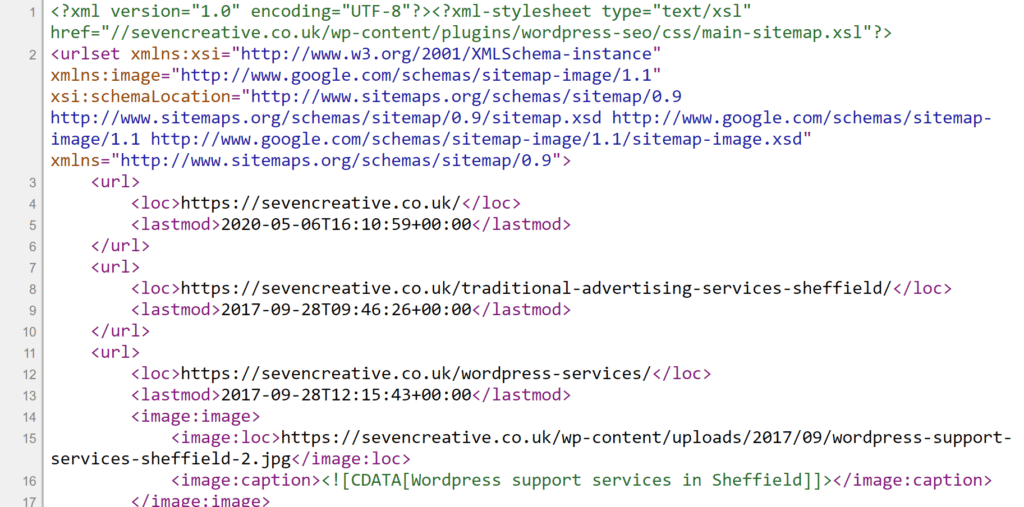
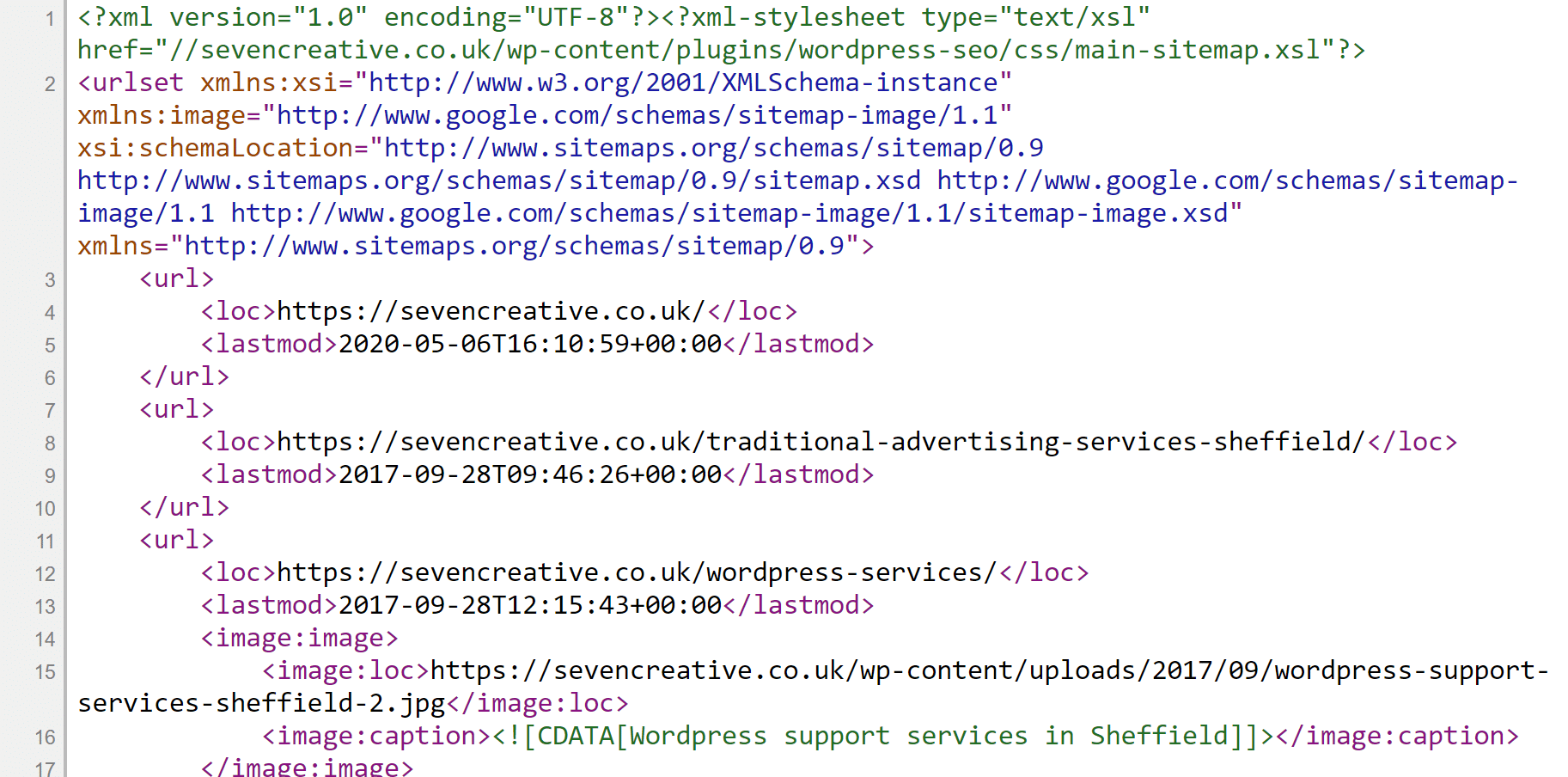
    Sitemaps for newer websites are often dynamically generated so change when new content is added. They use the XML mark-up which is like HTML but don’t have any styling information attached. Looking at the raw file may be confusing, but an XML viewer will show you the file in a more user-friendly format. Some internet browsers have an in-built XML viewer. Here is are the sitemaps for this website:

    Here is another example of a simpler sitemap:

    This particular site is quite big which hundreds of blog posts, articles, images and pages so the sitemap structure is quite big

    Website sitemaps are a very established part of a website structure (having been introduced in 2005) and continue to be important for search engine optimisation purposes. If you want your site to index properly within search engines, then making sure your sitemap is up-to-date and working correctly a very important part of your activity

    Is my website’s sitemap up-to-date?

    There are several ways to find out if your sitemap is up-to-date – some fast and some a bit more fiddly and slow. Some sites may not even have a sitemap which may be a problem from an SEO perspective. The best way to find out for certain is by asking an SEO expert to have a look.

    If you’re looking for an SEO expert or an SEO company in Sheffield for help with your website and its search engine optimisation (SEO), please give us a call on 0114 383 0711 or visit our contact section

  • The quick guide to the basics of SEO

    Search engine optimisation (or SEO as it’s more commonly known as) has many definitions but I prefer to describe it as the practice of improving your visibility in search engines for relevant search terms. Better visibility can be called higher rankings (or closer to page 1, result 1) and relevant search terms are words or phrase directly connected to the purpose of a website. Incidentally, Google describes SEO as ‘the process of making your site better for search engines’. The noun ‘SEO’ is used to describe someone like me who makes a living improving the search position of websites e.g. ‘I need to hire an SEO to get my site ranking’. It’s also quite common to use SEO as a verb e.g. to SEO a website or page.  

    This guide will focus on Google as they’re by far the largest search engine.

    1. Check your site is on Google

    Do a Google search for ‘site:’ followed by your website URL, for example, to find out if the website sevencreative.co.uk is on Google, search ‘site:sevencreative.co.uk’ (click here to see the results)

    If your site isn’t there, it’s probably due to one of the following reasons:

    • You don’t have any indexed links to your site
    • Your site is very new
    • Your site (or server) either blocks Google from indexing it or the search engine simply can’t read your site
    • Google has blocked your site from the search results (there could be lots of reasons for this)

    If you’re not sure why your site isn’t on Google when you think it should be, it might be time to call an SEO expert. Get in touch with us on 0114 383 0711

    2. Making your website content good for visitors makes it good for Google

    “Make your site interesting and useful” – Google

    Your website text and images need to be clear and relevant, and the titles and higher-up-the-page content is more important than the stuff lower down the page. For example, if the title of the page was simply ‘welcome’, it wouldn’t provide any real value to your visitors, it doesn’t mean anything out of context, and it probably has very little to do with the purpose of your site. Let visitors know what your site does quickly and efficiently in all titles and text with relevant narrative images. The title of this page is ‘The do-it-yourself guide to the basics of SEO’ and it’s a page about the basics of SEO. You know what the page is straight away and so does Google.

    When I explain to someone how to write a page I tell them there are three types of visitors you’ll get – those who skim the page quickly looking for the words and phrases they hope to see, those who will take the time to read every single word, and those who use are more included to use pictures to understand what a website page is about. Get the purpose of the site in the headings, explain the purpose well in the other content, and explain the site well with illustrative and relevant images. You need to cater for all these three people. In doing that you’ll also be catering for Google.

    Pro tips: Aim for at least 300 words per page if you can and be sure to give all your images ‘alt’ descriptions to explain to Google and those using screen readers what they are about.

    3. Make use of the ‘description’ meta tag – this explains to Google what the page is about

    This information is not displayed as part of your web-page but it used by Google to understand and display what your page is about.

    4. Optimise your images

    This is surprisingly important from an SEO perspective. Crop, size and compress your images to load quickly on your website. If you don’t have Photoshop try GIMP – it’s a free image editor

    5. Make your site mobile-friendly

    For many sites these days, most of their visits are by people using their smartphones. If your site isn’t able to be read and used properly by people using smart phones, your site may be penalised by Google

    6. Use your Google My Business page

    Yes, Google use this as a signal about whether your site is legitimate or not. Improve their content and they’ll improve your rankings.

    7. Make sure you have a sitemap and submit it to Google

    A sitemap is an index of all the pages on your site you’d like Google to visit (and also sometimes those pages and directories you’d order not be included in the search results). This is very important as it allows Google to know about pages that it might not necessarily find very easily.

    Sitemaps are commonly in XML format which is a simple but formal way of listing repetitive information in a file that allows the search engines to read it. Sitemaps are commonly in the same directory as the site’s index file and are normally simply called something along the lines of ‘sitemap.xml’. The main sitemap for this site is located here: https://staging.sevencreative.co.uk/sitemap_index.xml

    Not all sites automatically have a sitemap – sometimes you need to create one yourself and upload it to your site. If you’re using WordPress there are several plugins that will do this for you like Yoast or Google XML Sitemaps.

    8. Make sure you have an up-to-date and functioning robots.txt file.

    A “robots.txt” file tells search engines which files and folders it would like it to be able to access and asks it to not access others. Whether or not the search engine follows these requests, however, is a different thing. Google, however, does use the Robots.txt file and is therefore very important to get your site indexing properly. This file, which must be named “robots.txt”, is placed in the root directory of your site.

    Do you need a head start with your SEO?

    Give us a call here at Seven Creative if you need a head-start with your SEO. Whatever the age or subject of your site we can improve its position in the search results. Call us on 0114 383 0711 or use our contact form

  • The origins of Search Engine Optimisation (SEO)

    I’ve been working with websites since before search engine optimisation (SEO) was a ‘thing’. I originally taught myself HTML as a young teenager using a book I found lying about by Carol Vordernman and the rest, as they say, for me at least, is history. I’ve been providing SEO in Sheffield & further afield now for many years. The first of the more sophisticated search engines to start ‘crawling’ the web and using ‘back-links’ to help evaluate a website was BackRub (later Google) back in 1996. It ranked pages using citation notation, meaning any mention of a website on another site would count it as a kind of vote toward the site it pointed to. In other words, basic things like how many links and the quality of those links to a site would improve its ranking and thus the search engine optimisation industry was born.

    Sheffield SEO (Search Engine optimisation)
    Sheffield SEO (Search Engine optimisation)

    It was very easy to manipulate search engines in the early days

    Back in those early halcyon days, the world wide web was not widely understood and search engines were very easy to manipulate. As businesses began to see the potential of the internet, ‘experts’ appeared who promised to get them ‘up the rankings’. It was actually very easy to do using techniques such as keyword stuffing (for example, a hundred instances of a phrase, right at the bottom of a website, in white writing and on a white background or hiding keywords in the source code) and it actually worked! This, in conjunction with very little search engine competition, created a very profitable business for many SEOs. However, this situation meant that a poor quality site could often easily rank better than a good quality sites – and Google certainly didn’t like being manipulated. Google therefore developed & improved their search algorithm to spot ‘keyword stuffed’ sites and the big change came when they released the infamous Penguin update in 2012 – overnight, many poor quality and keyword stuffed websites dropped out of the search results.

    The new Penguin rules were:

    • Show all of your content.
    • Never stuff keywords in your text or in your images’ ‘alt text’.
    • Don’t use lists of keywords to promote your content.

    If you’re interested in a bit the internet history, you click here to read the official Google Webmaster Blog post entitled ‘Another step to reward high-quality sites’ from 24th April 2012

    SEO in 2020

    Roll on to 2020, and although SEO or search engine optimisation is still a thing, it’s actually almost unrecognisable compared to what it was in those early days. Nowadays we need to focus on providing value to the audience. This, in theory anyway, means that the audience will engage with it and the ‘signals’ (such as social shares, time spent on a site, inbound links) will naturally happen. These signals are what Google use to decide where your site should rank.

    Here is a list of good SEO practice from Google’s perspective in 2020:

    • Help Google find your content
    • Tell Google which pages shouldn’t be crawled
    • Help Google (and users) understand your content
    • Manage your appearance in Google Search results
    • Organise your site hierarchy
    • Optimise your content
    • Optimise your images
    • Make your site mobile-friendly
    • ‘Promote your website’
    • Analyse your search performance and user behaviour

    I’m not going to go into detail here about exactly what these ‘guidelines’ mean as each one warrants its own 1000 word article, however, the rules basically mean that you (as a site owner) and Google (as a search engine) need to meet in the middle. Google does as much as it can to ‘understand’ your site and you need to do as much as you can to help Google ‘understood’ your site.

    However, it all becomes a lot easier to understand when you consider the following facts:

    • Google is first and foremost an advertising agency
    • In order to remain as profitable as possible, Google need to provide the best value to it’s customers (the advertisers) by providing the biggest and most relevant audience (allowing more targeted ads which improves the ROI)
    • Google’s value therefore is in the audience it provides for its advertisers
    • The audience will naturally gravitate to the best search engine experience which includes:
      • High quality
      • Relevant
      • Fast
      • Trustworthy
      • Choice

    Therefore, the better your experience, the more likely you are to use their services.

    The only company who would be potentially able to do this better that Google is Facebook. However, the reason Facebook currently can’t compete is:

    • We don’t trust them anymore. The Cambridge Analytica scandal had a lot to do with this. Their app is also far too intrusive. For example, if you have a recent Android phone, have you tried removing or even disabling the Facebook app that comes pre-installed?
    • Their results aren’t always relevant or high-quality. The content is user-generated or created by advertisers so there often simply isn’t enough choice, quality or relevance

    More importantly than that, though, is that many of us can live quite happily without Facebook but how many of us can cope without a search engine?

    Improve your search engine rankings

    Google is a fact of life but your website languishing on page 4 isn’t. You’ve seen that good search engine optimsation is no longer ‘smoke and mirrors’, rather it’s a combination of providing quality to your audience and communicating effectively with Google. Time-consuming maybe but certainly not rocket-science (or should that be ‘rocket-surgery’?) If you’d like to know where your site can be improved, give us a call on 0114 383 0711   


  • Extend the registration period of your domain name for better SEO

    SEO boost - extend the renewal period of your domain name
    For an SEO boost – extend the renewal period of your domain name

    The website domain name is often overlooked in SEO terms as people focus on inbound links and optimised web copy, however, your domain name – or in this instance the information relating to it – is one of the important criteria used by Google when evaluating your website.

    We all know that new domain registrations are likely to be sand-boxed as Google prefers to err on the side of caution when it comes to a potential pop-up website, however, once your site is established and your domain name is at least a good few months old, Google will begin its ongoing assessment of your website including the information relating to the domain and use it to decide how important your site it.

    Google really ‘likes’ older domain names with long registration periods to go. You can now commonly register the most popular domain names for up-to 10 years. Not only will you save money and not have the hassle of trying to remember when it’s due for renewal, you’ll have the extra SEO benefit of indexing better within the search results!

    If you’re still unsure about why this is important, think about it like this. If I were of a nefarious persuasion with wicked SEO skills, I could very easily set up an eCommerce website, optimise it to get it to the top of the search results and start taking money off people. This is very easy to do and there were, for example, some very high profile cases of this happening, for example, during the most recent Wimbledon tennis tournament.

    This type of site has to be quick – people are going to start complaining pretty quickly when they don’t get what they’ve bought so the site isn’t going to be up for that long when the authorities find out. Therefore, if Google sees a new website with a recently registered domain name and a short registration period, alarm bells will go off! This is why a pre-emptive suppression within the search engine results is the simplest solution to this potential problem. The legitimate sites will register their domains for longer and they’ll still be up and running in a few months. It’s a bit like a website probationary period.

    In summary, if you want your site to be taken seriously by Google and indexed properly, extend the registration period of your domain name.

    If you need help with your domain renewal period, or anything else relating to SEO or search engine optimisation, call us here at Seven Creative on 0114 235 2002 or see the other contact options