Category: Microsoft Exchange

  • Microsoft Exchange hacked? What now?

    Microsoft Exchange hacked? What now?

    If your Microsoft Exchange account has been hacked, you’re probably panicking and wondering what to do now. Here is a list of steps to take. It’s not exhaustive but should get you at least back up and running with a secure account.

    Why was your account hacked?

    Hackers want people’s usernames and passwords which may then allow them to access their online accounts. They’ll often do this using a technique known as ‘phishing’ – they’ll send an email purporting to come from a legitimate source but linking to fraudulent websites that are designed to steal personal data or information such as credit card numbers, passwords, account data, or other information.

    They hack your account to send their phishing links to your contacts as they know an email sent from a known contact is much more likely to be trusted by the recipient, and an email from a previous contact is much more likely to get through a spam filter. In other words, they want your contacts username and passwords and will pretend to be you to get them.

    Start by changing your password

    If you can still log into your account, change your password. If you can’t, can you do a password reset? If this isn’t setup, does your Exchange administrator have access to do this for you? If not, contact Microsoft Exchange support directly as soon as possible to secure your account

    Check your Mail Flow rules

    A hacker wants your account to remain accessible to them for as long as possible so it’s not always very likely that they’ll change your password themselves – you’ll know something’s wrong straight away if this happens. Rather they’ll make sure that any reply emails sent to you by confused contacts won’t arrive in your inbox meaning you’ll not see them. The only other place you’re likely to check if you stop receiving emails is your junk folder but it’s more likely that the hacker will have created a rule to instead send all received emails straight to your deleted folder. Therefore, check your mail flow rules to make sure emails aren’t being redirected somewhere else.

    Check your sent items

    I don’t necessarily mean your ‘sent items folder’ (although a look here too won’t go amiss). Rather check which emails have been sent using the ‘message trace’ search function in the ‘mail flow’ section of the Exchange admin. This will show you which emails were sent from your account and to whom they were sent. When you’re back up and running, you may decide to send an email to anyone who received an email from your account sent by the hacker – this is where you’ll find out who that was.

    Check your auto-responders

    Does everything here look how it should be and how you left it?

    Check your RSS feeds

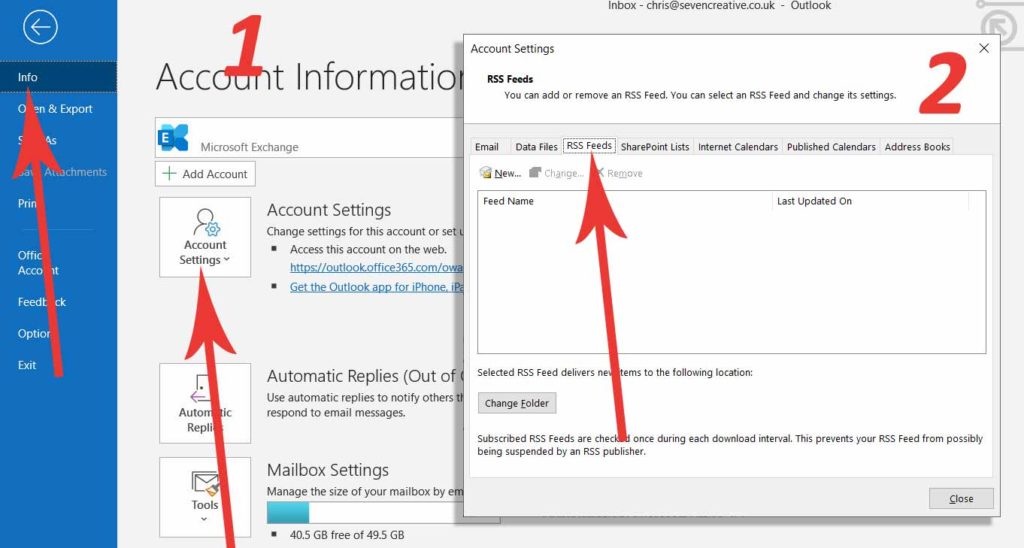
    One of the ways hackers will access important emails is by creating an RSS feed. To check this from Outlook, go to the file option (top-left), select ‘account settings’, then select the RSS tab in the following window.
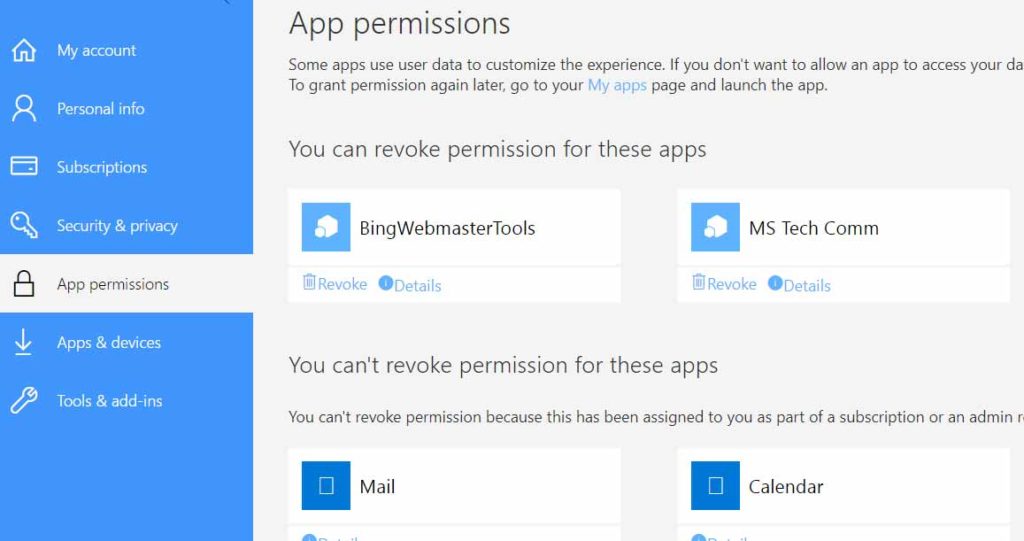
    Check app permissions via your online account
    Anything else?

    Once you’re back up and running and your Microsoft Exchange is secure, consider enabling 2-factor-authentication and of course it’s a good idea to make sure you’ve got good quality anti-virus software running.

  • Microsoft Exchange vs POP email vs free email

    For virtually all of us, email is now a fact of life, however, not all email services were created equal. Within my career I’ve seen the first wide-scale early adoption use of business email back in the 90’s, all the way to smart phone with voice assistant here in the 20’s so I’ve certainly seen some changes in how email is used in my time!

    In the ‘old days’ when we just had a computer at work and one email client, we simply used POP and SMTP for our email – it was reliable and there was never any problem with emails syncing across multiple devices because we simply didn’t have multiple devices. Many companies had their own server running Microsoft Exchange but they were very difficult to configure and expensive to maintain – you needed to be very technical to manage one so probably needed an IT department as a company. Before long, people also wanted a personal email address they could use to send jokes and funny pictures so services like Yahoo Mail started to become widely adopted by people. We’d access this on our new home computers which began dropping in price and Windows ’98 was easy enough to use for basic functionality like browsing the internet.

    Roll on to 2020 and everyone now has the option to use Microsoft Exchange for their email. It’s reliable, slick, professional looking, cloud-based, and surprisingly cheap! However, best of all, you don’t need an MA in Computer Science anymore to use it. So why isn’t everyone using Microsoft Exchange?

    I’m still astonished to see vans driving about with BTINTERNET email addresses on the side or when you get an email from a seemingly successful company from a HOTMAIL address. I was recently asked to help several businesses sort out their email services when FREESERVE closed their email services down with very little notice and now companies like VIRGIN MEDIA and SKY have been in the news for their unfair charges relating to people wanting to keep their email address when they’re no longer a customer.

    My advice to all of these people – businesses and individuals – is to get control of your own email. Email addresses are no longer disposable; we might keep our email address throughout our whole lives. So why take the risk of leaving something so important in the hands of a corporation who may change their business model and decide email customers are no longer important – and this has happened recently!

    Instead of simply recommending how you should manage your email, I’ll tell you my email setup – you can’t get a better recommendation than that!  I use Microsoft Exchange. I use 4 different devices – Windows laptop, 2 x iPads, Android phone – and all 12 years of emails since I started using this email address are accessible on any of them instantly (sent, received, saved and archived). I could be either at home, in the office, sitting on a beach in La Palma, or at 3000 metres at the top of a mountain in the snow and I can just as easily read and reply to any email (I’ve actually done this). If my house is flooded and I lose all my devices, I can’t lose any emails. I can pop next door to borrow their computer to access my web version of Outlook whilst I’m waiting for replacements and everything is there. Honestly, moving from POP, IMAP and SMTP email is one of the best decisions I’ve made from a business perspective.

    Get in control of your email, get everything secure, and make your life easier. Call me for more info on 0114 383 0711

    comparison of the different main email types

    Free (such as Hotmail) POP or IMAP Microsoft Exchange
    Synchronises all your saved, sent and received emails across all your different devices instantly
    Synchronises your calendar across all devices
    Compatible with all mobile phones, laptops and computers
    Available as webmail
    Reliable
    Advert-free
    You own it
    All emails backed up in the cloud
    Use your own domain
    Looks professional
  • Why move to Microsoft Exchange?

    Move to Microsoft ExchangeIt’s the year 2000. We’re at work. We sit in front of our computer, reading and replying to our emails. At the end of the day we turn the computer off. Everything is done… except it’s not! We’re driving home and remember that really important email we forgot to reply to. Did we press send on that email to the printer? Has the email about the contract arrived? Even worse – we’re on the first day of our two-week holiday and we suddenly start to feel anxious wondering what emails are arriving whilst we’re away and knowing that we’ll not see them until we’re back. 

    Fortunately, it’s not 2000 anymore and it doesn’t have to be like that. We now have the option to check our emails anywhere or anytime we want – whether sent, received, or in folders. We have smart phones in our pockets, tablet computers in our bags and laptops we can take with us – all is OK… or is it? The problem is that the email system that most people use is still from the year 2000. It simply wasn’t designed for modern devices and certainly not for multiple devices. It was designed for a time when we only used one computer which didn’t move – it’s 2020, why can’t we see sent items?! Why can’t we access our folders and email archives?!

    And even worse than that, what happens when our computer dies or our phone gets stolen! Is everything is lost? 

    There is a solution – a great solution!

    Not very long ago, it was only the big, wealthy companies used Microsoft Exchange for email. It was very expensive, difficult to configure, and needed an IT department to maintain it. But they knew how powerful it was and how valuable it was to their organisations so they made the investment… and it paid dividends for them! Send an email from one computer and it’s immediately also there, synchronised in ‘sent items’ on all your devices. You’re at home and can’t remember if you sent that important email? Check the tablet computer and you can instantly see. Need to look at an email from a few years ago? You can do it wherever you are at any time. Put a meeting in the diary on your computer when you were at work? Your phone dings to let you know it’s coming up in to hours. No more missing emails. No more duplicate diaries. No more having to wait to view old emails. No more frustration!

    Roll on a few years to now and that same system is now available to all of us no matter how big or small our companies. And it’s much, much cheaper and, once set up, takes virtually no maintenance. One email address or one-hundred email addresses – it just works, brilliantly!

    Your emails, folders, calendars instantly synchronised across all your devices and available when you want them to be. And even better than that,

    Get a great nights sleep!

    Actually, we can’t guarantee you’ll get a great nights sleep knowing your emails are all fully backed-up in the cloud and that all your documents are safe no matter what happens to your computer, however, I’m sure it’s going in the right direction.

    Microsoft Exchange and OneDrive is the system I use and you can’t get a better recommendation than that! Free yourself up from email frustration or worry and allow yourself to focus on your business.

    Find out more today by calling me on 0114 383 0711